


Mobile Device Manager Plus
Mobile Device Manager Plus (MDM Plus) from ManageEngine is a comprehensive management solution for mobile devices, allowing organizations to centrally manage and secure all their mobile endpoints. The solution simplifies IT management by enabling configuration, monitoring, and maintenance of devices from a single console, without compromising IT security.
Mobile Device Manager Plus supports a wide range of operating systems, including iOS, Android, Windows, macOS, and Chrome OS. With Mobile Device Manager Plus, you can quickly enroll devices, enforce policies and configurations, distribute apps, separate corporate and personal data, and perform real-time troubleshooting remotely.
Manage your mobile endpoints more easily and securely with Mobile Device Manager Plus for higher productivity, consistent security, and centralized visibility across all your mobile devices.
Why Mobile Device Manager Plus?
- Single console for managing mobile devices and desktops, making administration clear and efficient.
- Support for multiple platforms (iOS, Android, Windows, macOS, Chrome OS) from one management environment.
- Automate tasks such as app installations, configurations, and security policies to reduce time-consuming work.
- Secure mobile devices with policies, encryption, remote lock/wipe, and compliance control.
- Real-time remote troubleshooting and monitoring to resolve issues promptly.
- Scalable for organizations of different sizes with cloud and on-premises options.
- Comprehensive reporting and auditing for insight into device status and compliance.
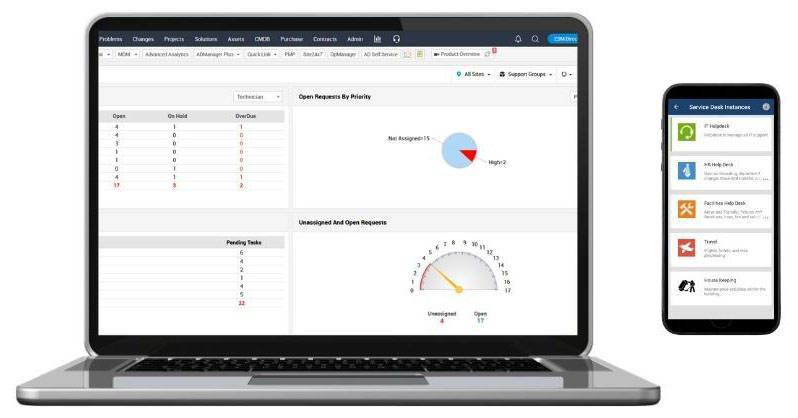
Always stay in control with one central and customizable dashboard
With Mobile Device Manager Plus, you can easily manage all mobile devices, laptops, and endpoints from a single console. This unified dashboard provides a clear overview of your entire device ecosystem, including status, compliance alerts, and device details, enabling quick action.
From this central hub, you can streamline operations, configure workflows, and roll out updates to groups or individual devices. Profiles and policies can be automatically applied to ensure all devices comply with corporate and IT security rules.
Thanks to the intuitive interface, devices can be onboarded, configurations automated, and real-time issues identified and resolved without complex training.
Save time and costs, choose Mobile Device Manager Plus!
With a single solution, you can enroll devices, distribute apps, enforce security policies, and gain instant insights through the clear dashboard. Onboarding is quick, updates and configurations are simple with a click, making mobile device management more organized and efficient than ever.

Seamless application distribution and management
Mobile Device Manager Plus allows you to centrally manage and securely distribute applications to all mobile devices and laptops in your organization. Both in-house and store apps can be deployed in bulk, with pre-defined configurations and permissions, including silent install options.
Stay always up-to-date and in control: apps can be automatically updated, only approved apps are allowed via whitelist/blacklist policies, and you can monitor installation statuses and licenses. This enables efficient and secure full lifecycle management of applications.
App Distribution
Easily manage and distribute in-house and store applications across all devices, regardless of operating system.
App Restrictions
Kiosk Mode allows you to configure devices so that only certain applications can be used.
App Inventory
Inventory provides detailed information about application licenses on mobile devices in your network

Security of Mobile Devices
During times of a hybrid working-environment, it is becoming more and more important to esure that mobile devices are protected. This way, you can limit dangers from cybercriminals and is confidential information protected.
Securing your mobile devices is done with Mobile Device Manager Plus.
Data Wipe
In case of device theft or loss, you can track the device or wipe data to prevent misuse.
High-Risk Reporting
Identify devices that violate policies and detect compromised or jailbroken/rooted devices within your network.
Secure Network Access
Protect your network with role-based user permissions and restrict access to corporate accounts.

Email Security
Secure email access on mobile devices with Mobile Device Manager Plus. Integrates with platforms like Azure and Office 365, ensuring attachments are only opened via secure apps in compliance with Conditional Exchange Access (CEA).

Other useful features of Mobile Device Manager Plus
Easy document distribution to devices
Distribute documents and media files in bulk to managed mobile devices through the MDM console.
Secure document viewing and storage
Documents can be safely viewed and stored locally using the MDM app, with access restricted to trusted applications.
Automatic document updates
When a new version of a document is uploaded to the content repository, all previously distributed copies on devices are automatically updated.
Third-party backup restrictions
The MDM content feature prevents distributed documents from being accessed by unauthorized apps or backed up to external cloud services.
Support for multiple file and media formats
The MDM content distribution supports a wide range of document and media formats viewable through the MDM app.
Demo or quote?
Discover how Mobile Device Manager Plus can empower your organization. No obligations, no cost. Our experts will demonstrate the possibilities and answer all your questions.
Bel +31 (0)20-6104888
Related articles
More articles